

You know the exact feeling. A client needs a new landing page, a multi-step survey, and a custom calendar booking flow. You open up your builder, stare at a blank screen, and wait for inspiration to strike. It doesn’t.
Instead, you spend the next four hours dragging and dropping elements, fighting with mobile padding, and hunting down stock photos that don’t look completely cheesy.
By the time you finally get the layout right, half your day is gone and you haven’t even written the actual copy. This manual, pixel-pushing process is a massive bottleneck. It kills your speed to market and destroys your agency’s profit margins.
That ends right now. Enter HighLevel’s AI Studio. This isn’t just a basic page builder. It is a conversational, AI-powered workspace that turns your raw ideas into fully functional digital experiences instantly. Let’s get it fired up.
Part 1: Understand the Leverage of AI Studio
Before we click anything, let’s get clear on what this tool actually does. AI Studio is your creative engine. You give it a prompt, a live URL for inspiration, or even uploaded branded photos, and it generates the layout, the content, and the visuals. If you don’t like something, you just type natural language follow-up instructions to refine it.
The best part? It is not just for static websites. You can use it to build:
- Landing pages based on live URLs.
- Storefronts using your own branded images.
- Dashboard layouts for specific business use cases.
- Appointment booking flows connected straight to your calendar.
- Interactive, multi-step surveys and client-facing forms.
Note: Do not confuse this with Agent Studio! AI Studio is the conversational builder that creates your web assets and pages. Agent Studio is the visual builder used to create AI bots that interact with users and automate tasks.
Part 2: How to Enable and Access Your Workspace
Ready to streamline your page-building process and start shipping faster? Here is exactly how to do it in 60 seconds:
- Open your Sub-account inside HighLevel.
- Navigate to your settings and ensure AI Studio is enabled inside Labs (if it is not already turned on).
- Look at your left navigation panel.
- Click on AI Studio to open your new unified creative workspace.
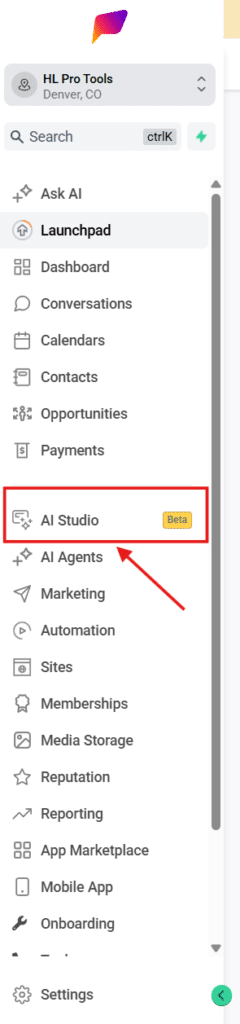
From this central hub, you can generate new projects, request natural-language edits, use version history to safely test changes, and manage all your folders. Once your project is ready, you can preview it, publish it, and connect a custom domain right then and there.
Stop wrestling with blank pages and let AI do the heavy lifting so you can focus on actually launching campaigns and closing deals.
Frequently Asked Questions
How do I understand the Leverage of AI Studio?
Before we click anything, let’s get clear on what this tool actually does. AI Studio is your creative engine. You give it a prompt, a live URL for inspiration, or even uploaded branded photos, and it generates the layout, the content, and the visuals. If you don’t like something, you just type natural language follow-up instructions to refine it. The best part? It is not just for static websites. You can use it to build: Landing pages based on live URLs. Storefronts using your own branded images. Dashboard layouts for specific business use cases. Appointment booking flows connected straight to your calendar. Interactive, multi-step surveys and client-facing forms. Note: Do not confuse this with Agent Studio! AI Studio is the conversational builder that creates your web assets and pages. Agent Studio is the visual builder used to create AI bots that interact with users and automate tasks.
How to Enable and Access Your Workspace?
Ready to streamline your page-building process and start shipping faster? Here is exactly how to do it in 60 seconds: Open your Sub-account inside HighLevel. Navigate to your settings and ensure AI Studio is enabled inside Labs (if it is not already turned on). Look at your left navigation panel. Click on AI Studio to open your new unified creative workspace. From this central hub, you can generate new projects, request natural-language edits, use version history to safely test changes, and manage all your folders. Once your project is ready, you can preview it, publish it, and connect a custom domain right then and there. Stop wrestling with blank pages and let AI do the heavy lifting so you can focus on actually launching campaigns and closing deals.
Start Your HighLevel Free Trial
Browse all GoHighLevel guides · AI & Chatbots.