

WordPress is a powerful platform for building websites, but integrating advanced marketing automation and CRM tools often requires multiple third-party plugins. With the HighLevel WordPress Plugin, WordPress users can now seamlessly connect their sites to HighLevel, unlocking advanced lead capture, chat automation, SMTP email, and funnel integration—all from one place.

If you’re looking for a way to enhance lead generation, improve customer communication, and streamline marketing efforts
, the HighLevel WordPress Plugin,
LeadConnector, is an excellent supplement to your existing WordPress setup.
What is the HighLevel WordPress Plugin – LeadConnector?
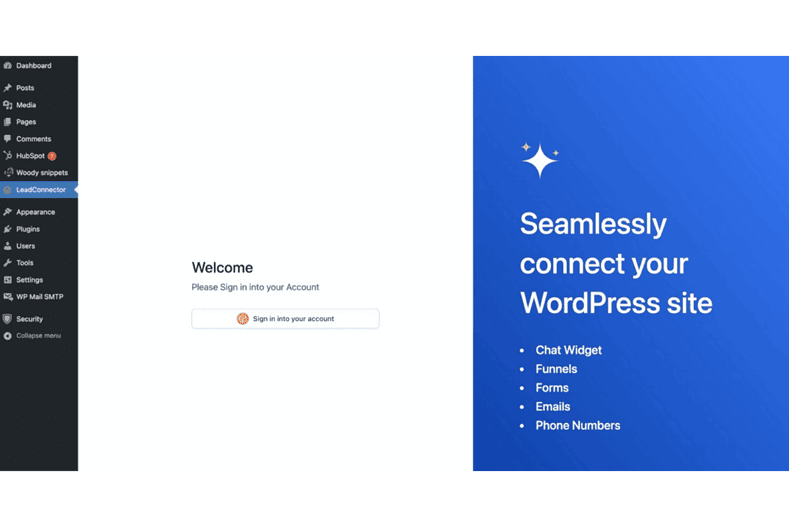
The HighLevel WordPress Plugin, LeadConnector,
bridges the gap between WordPress websites and HighLevel’s all-in-one marketing platform. It enables businesses to embed lead forms, chat widgets, and funnel pages
into their websites, helping capture and manage leads more effectively without requiring custom coding.
Since HighLevel operates under a gray-label system
, this plugin is listed under LeadConnector
in the WordPress Plugin Directory rather than under the HighLevel name.
💡 Want to learn more about HighLevel?
Check out our detailed guide: What is GoHighLevel and How Does It Work?
.
Key Features of the HighLevel LeadConnector WordPress Plugin
Chat Widget Integration
Easily add a live AI-powered chat feature
to your website, enabling real-time conversations with visitors. This can boost engagement and improve conversion rates by allowing you to interact with potential customers instantly.
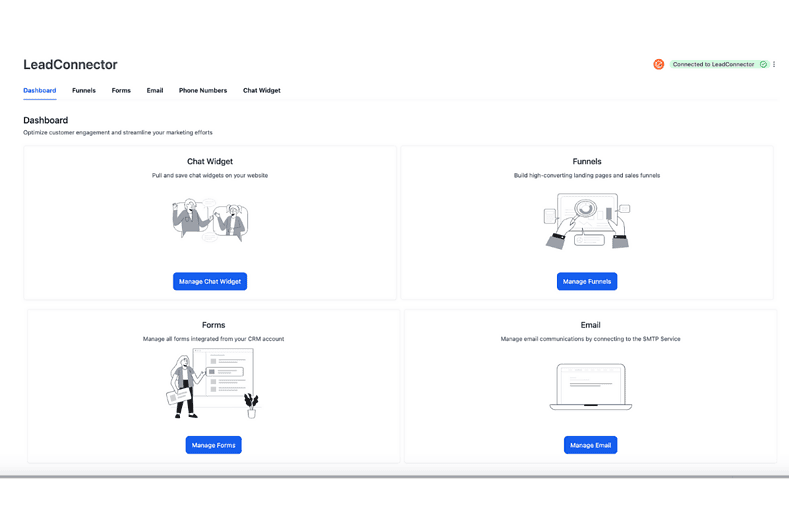
Embed Funnel Pages
WordPress users can now import and embed HighLevel funnel pages
directly into their websites. This makes it easy to build and deploy high-converting landing pages without using additional page builders.
Multi-Account Support
For agencies and businesses managing multiple HighLevel sub-accounts, the HighLevel WordPress Plugin
(LeadConnector) now allows you to switch between different accounts
,
making it easier to manage multiple client sites from one dashboard.
Enhanced Email SMTP Configuation
Users can configure SMTP settings for email
directly from WordPress, ensuring smooth email automation and delivery for marketing campaigns and transactional emails.
How to Install and Set Up the HighLevel LeadConnector WordPress Plugin
Step 1: Install the Plugin
⦿
Log into your WordPress dashboard.
⦿
Navigate to Plugins > Add New
.
⦿
Search for LeadConnector
.
⦿
Click Install Now
and then Activate
.
Alternatively, you can download the plugin directly from the WordPress Plugin Directory
.
Step 2: Sign In to Highlevel
⦿
After activation, go to LeadConnector
in your WordPress admin panel.
⦿
Click on Sign In
to log into your HighLevel account
within the plugin.
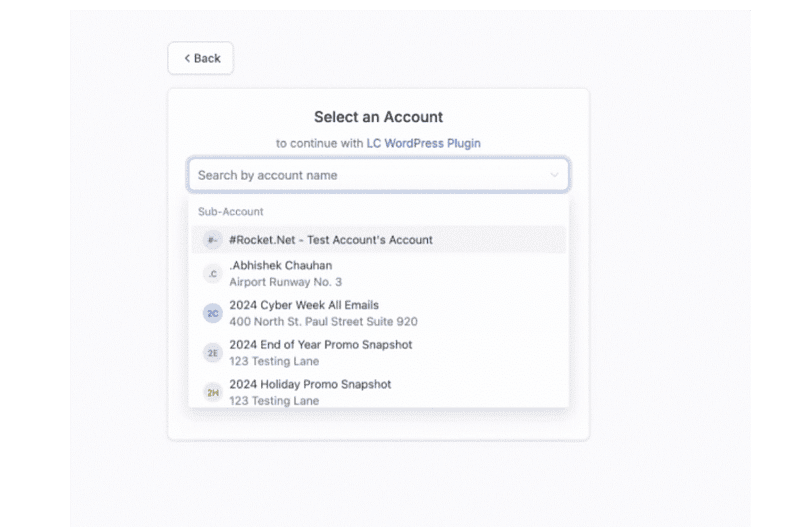
Step 3: Select Your Sub-Account
⦿
Once signed in, you’ll be prompted to select a HighLevel sub-account
.
⦿
Choose the appropriate sub-account to link to your WordPress site.
Why WordPress Users Should Consider the HighLevel LeadConnector WordPress Plugin

Many WordPress users rely on separate plugins for live chat, lead forms, email marketing, and funnel creation. The HighLevel WordPress Plugin, LeadConnector,
consolidates all these features into one plugin, making it a great supplement to your existing WordPress site. Here’s why you should consider adding it:
🔹 Reduces dependency on multiple plugins
– Minimize conflicts and improve site performance.
🔹 Streamlines lead management
– Capture, nurture, and convert leads more efficiently.
🔹 Enhances automation
– Syncs with HighLevel’s CRM for seamless marketing workflows.
As WordPress continues to evolve, some businesses are also exploring alternative platforms
that offer built-in automation, CRM, and managed hosting
. If you’re curious about why more users are looking beyond WordPress in 2025
, check out Why WordPress Users Are Exploring Alternatives in 2025—And Why HighLevel Is on Their Radar
Final Thoughts

For WordPress users looking to expand their lead generation and automation capabilities
, LeadConnector, the WordPress Plugin
for HighLevel, offers an easy-to-use solution.
With AI-powered chat widgets, funnel embedding, multi-account support, and SMTP email configuration
, it integrates powerful HighLevel tools directly into WordPress.
If you’re considering HighLevel as a supplement to your WordPress site
, this plugin provides a seamless way to connect the two platforms. Try it today!
👉 Download the plugin from the WordPress Plugin Directory
💡 Want to learn more about HighLevel and how it can transform your business?
Check out our in-depth guide: What is GoHighLevel and How Does It Work?
Recent Posts from Danish Hussain:
Published by Danish Hussain. This adapted guide includes licensed source material. Product details, event information and promotional terms reflect the coverage date; check the provider for current terms.