

If you’re running a business in Latin America — or serving clients who do — accepting payments just got a whole lot easier. HighLevel now supports Mercado Pago as a native payment provider, giving agencies and sub-accounts across seven LATAM countries a localized way to collect payments directly through the platform. Let’s dive in.
Key Takeaways
- Mercado Pago is now available as a native payment integration in HighLevel for seven LATAM countries
- Setup requires only your Public Key, Access Token, and a webhook configuration in Mercado Pago
- Works across all payment channels — funnels, calendars, invoices, payment links, stores, and more
- You can configure which channels use Mercado Pago vs. other providers on a per-channel basis
- Only local/regional currencies are supported — dynamic currency conversion is planned for the future
1. What Is the Mercado Pago Integration?
Mercado Pago is the leading payment platform in Latin America, operating across multiple countries with deep local payment method support. HighLevel’s native integration means you no longer need third-party workarounds or Zapier bridges to accept payments from LATAM customers.
The integration is available for both agencies (at the agency level) and sub-accounts (at the location level). Once connected, Mercado Pago becomes a payment provider option anywhere you accept payments in HighLevel.
Supported Countries
At launch, the integration supports these seven countries:
- Argentina
- Brazil
- Chile
- Colombia
- Mexico
- Peru
- Uruguay
More countries are planned based on demand. If your market isn’t listed yet, keep an eye on the HighLevel changelog for expansion announcements.
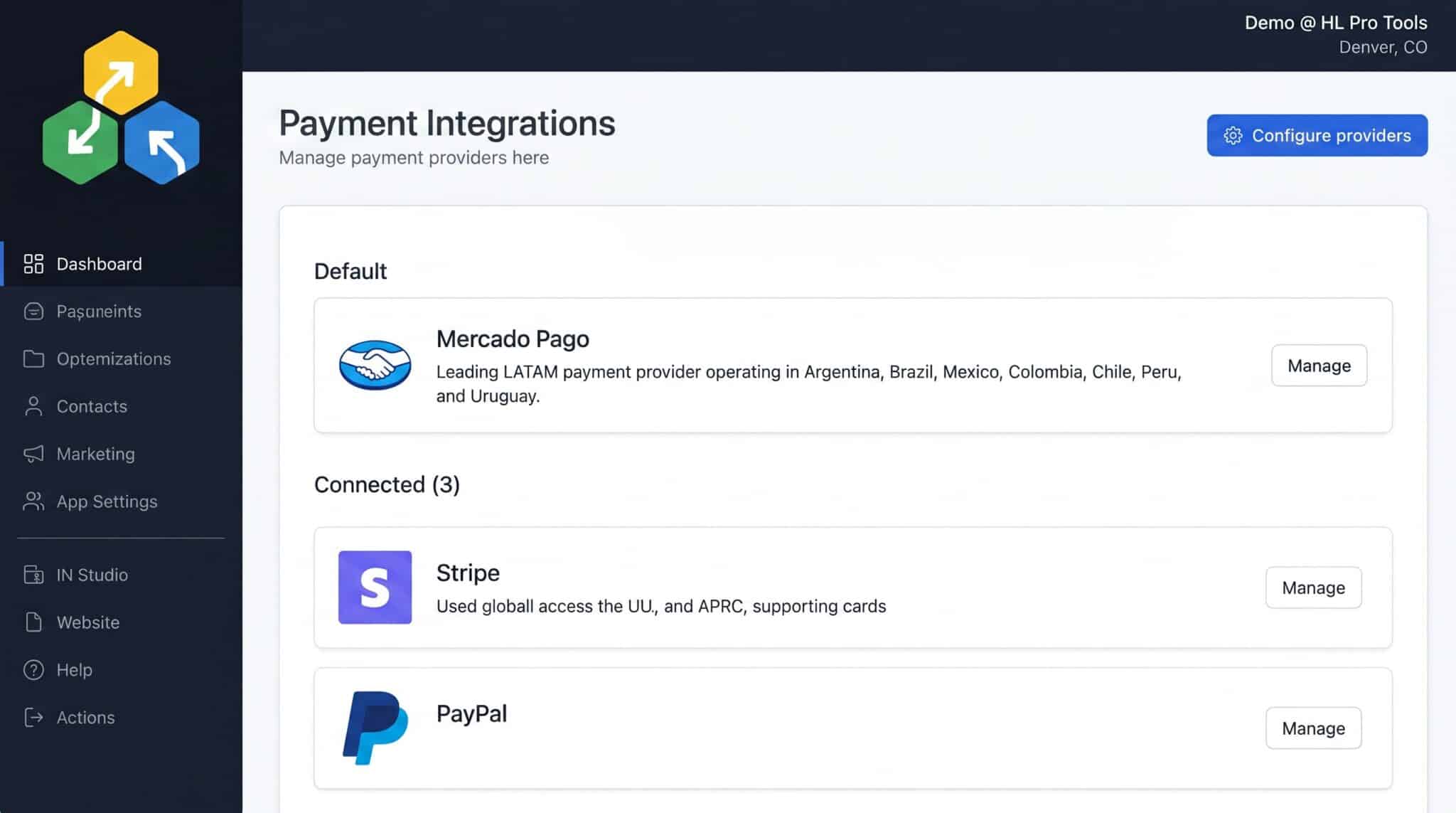
2. How to Connect Mercado Pago to HighLevel
Getting started takes just a few minutes. You’ll need your Mercado Pago account credentials and access to the Payments section in HighLevel.
- Navigate to Payments — From the left navigation bar, click Payments and then open the Integrations tab
- Select Mercado Pago — Click on Mercado Pago from the available providers list
- Enter your credentials — Input your Public Key and Access Token from your Mercado Pago developer dashboard
- Select your country — Choose your operating country from the dropdown (Argentina, Brazil, Chile, Colombia, Mexico, Peru, or Uruguay)
- Complete webhook setup — Follow the instructions to configure the webhook URL in your Mercado Pago account to finish the connection
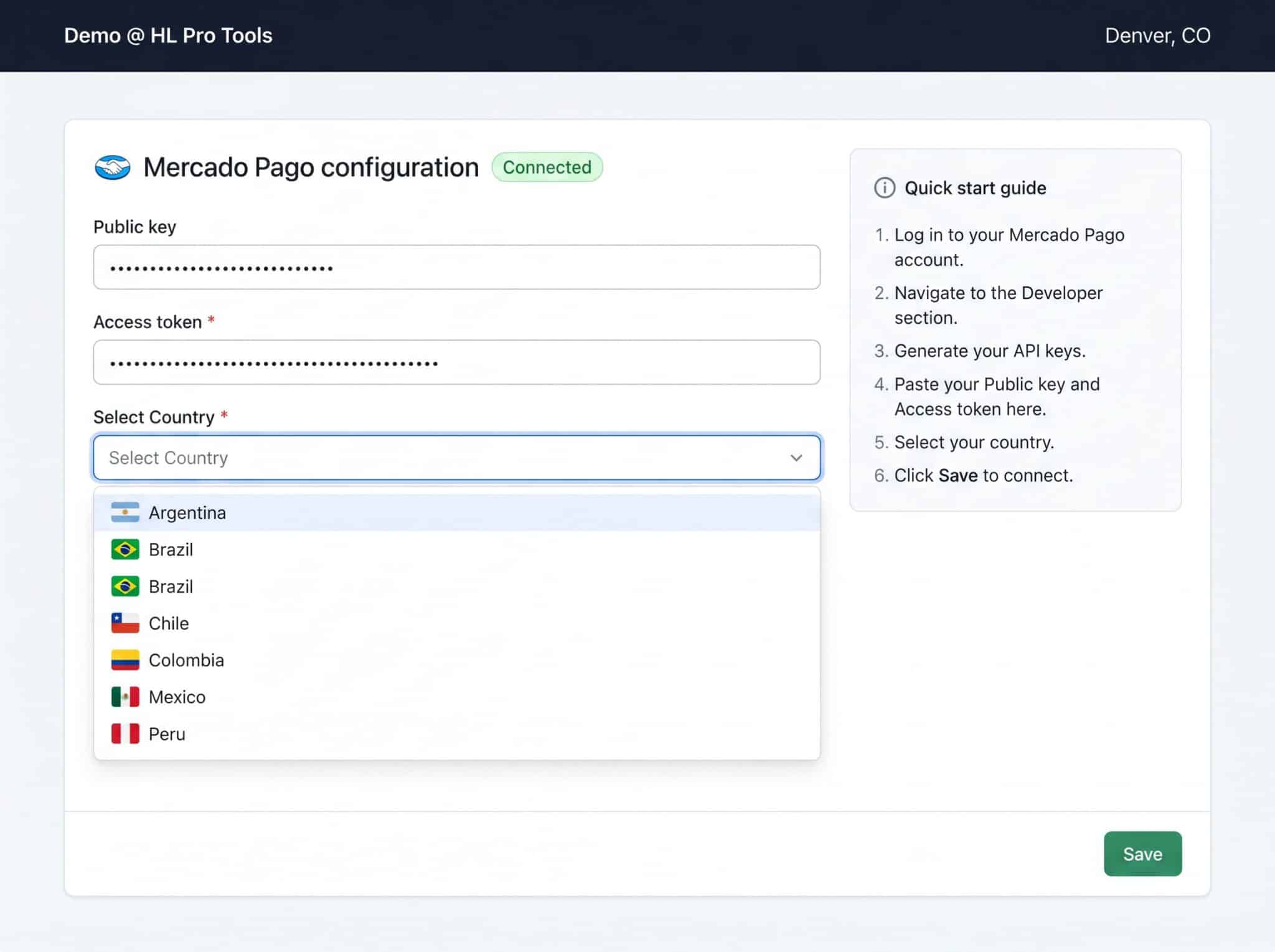
Pro Tip: You can find your Public Key and Access Token in your Mercado Pago developer dashboard under Credentials. Make sure you’re using the production credentials, not the test/sandbox ones.
3. Where You Can Use Mercado Pago
Once connected, Mercado Pago works across every payment channel in HighLevel. This means you can accept LATAM payments in:
- Funnels — One-step and two-step order forms
- Calendars — Paid appointment bookings
- Invoices — Send invoices with Mercado Pago as the payment method
- Payment Links — Standalone payment pages
- Stores — E-commerce product purchases
- Products — Digital and physical product sales
- SaaS Mode — Subscription billing for your SaaS clients
- Communities — Paid community access
- Courses — Course enrollment payments
- Surveys — Payment-gated surveys
One-Step Order Forms in Funnels
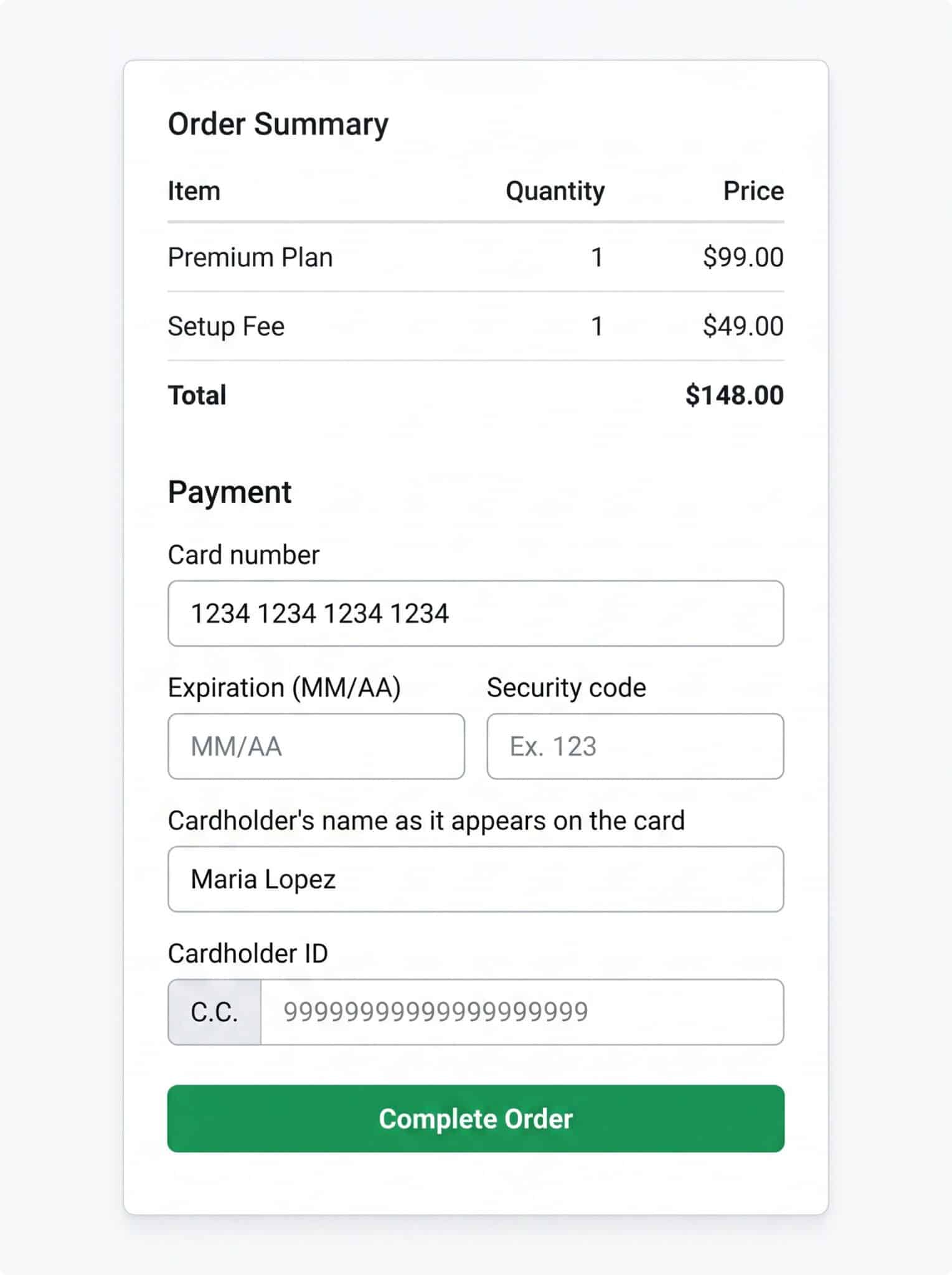
When a customer checks out through a funnel, the payment form automatically includes LATAM-specific fields like Cardholder ID (C.C. — Cédula de Ciudadanía or equivalent national ID). This is required for Mercado Pago transactions in most countries.
4. Configuring Mercado Pago Per Channel
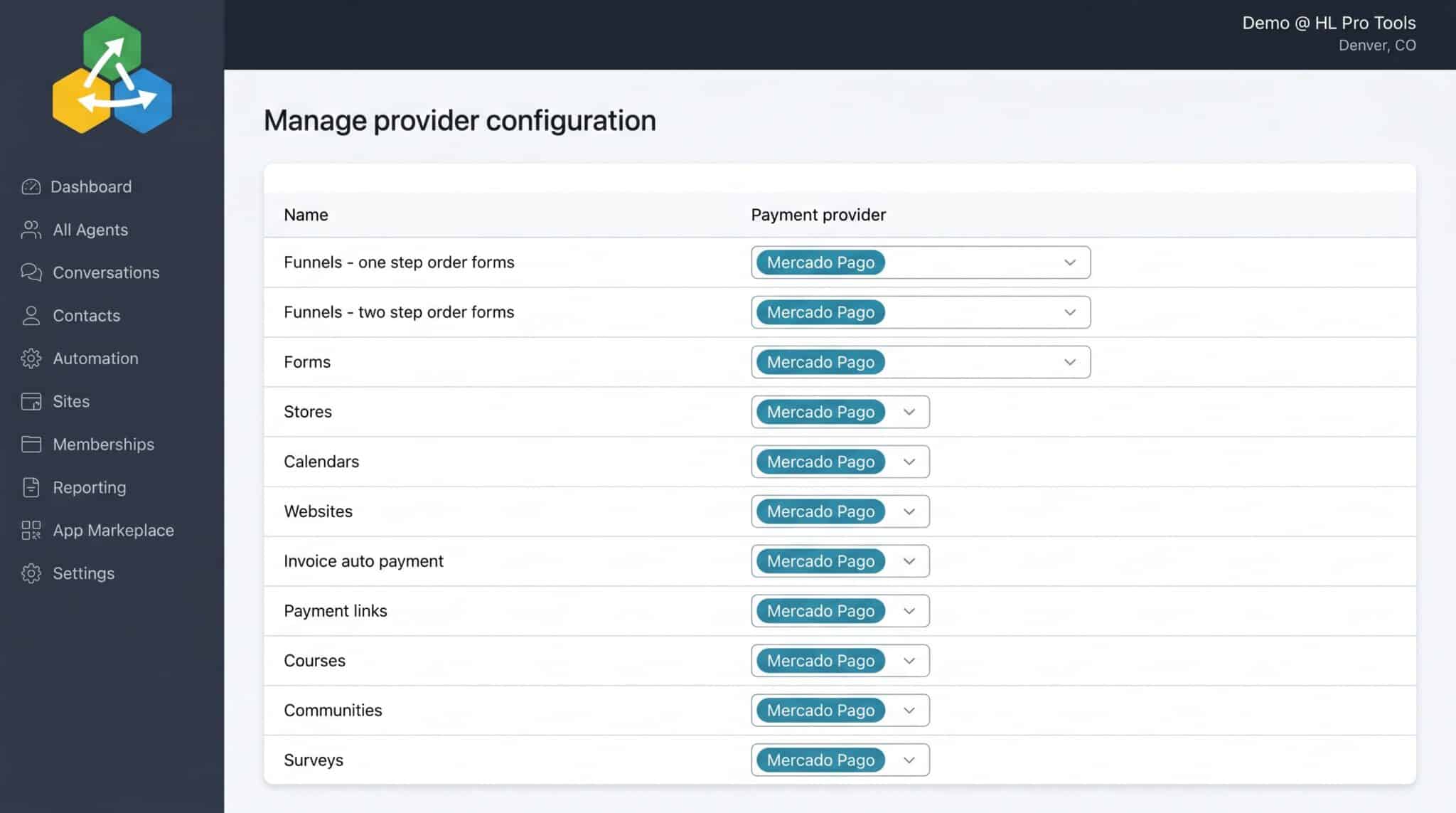
You don’t have to use Mercado Pago everywhere. HighLevel’s Configure Provider feature lets you choose which payment provider to use on each channel individually.
For example, you might use Mercado Pago for your funnels and payment links (targeting LATAM customers) while keeping Stripe for your calendars (serving international clients). The configuration table lets you set this up in seconds.
5. Viewing Mercado Pago Transactions
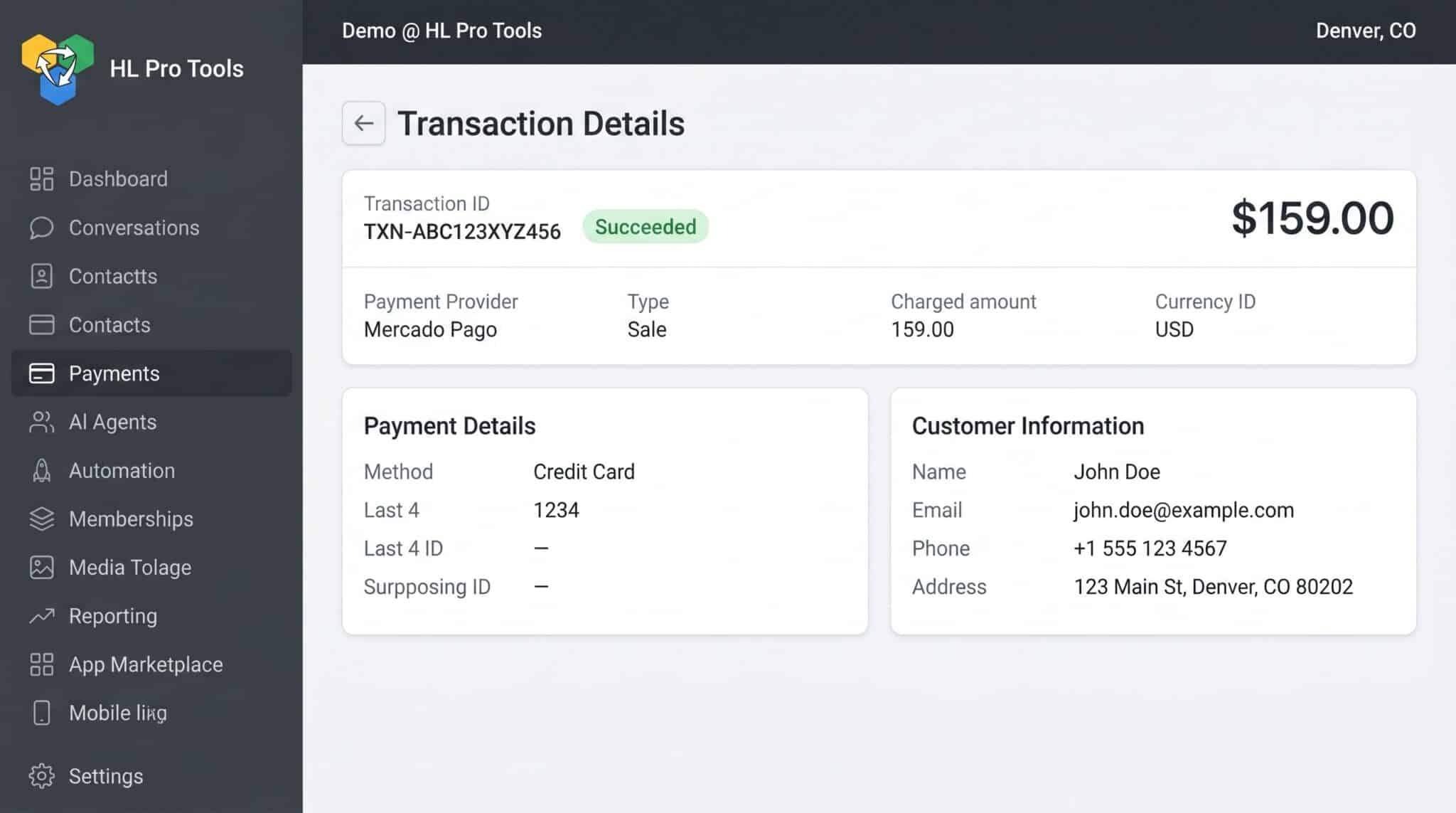
All Mercado Pago transactions appear in the standard Payments > Transactions tab, just like Stripe or PayPal transactions. You’ll see the payment provider listed as “Mercado Pago” along with the full transaction details including amount, customer info, and status.
6. Important Requirements and Limitations
Before you start accepting payments, there are a few things to keep in mind:
- Minimum amounts — Each country has minimum transaction amounts that must be met. Check Mercado Pago’s documentation for your specific country’s limits.
- CVV-less payments — You must enable CVV-less payments on your Mercado Pago account for recurring or saved-card transactions to work.
- Local currencies only — Currently, only local/regional currencies are supported. If your product is priced in USD, the customer will see the equivalent in their local currency based on Mercado Pago’s conversion rates.
- Cardholder ID required — Most LATAM countries require a national identification number (C.C., CPF, RUT, etc.) for card transactions. This field is automatically included in payment forms.
Pro Tip: If you’re serving multiple LATAM countries, you may need separate Mercado Pago accounts for each country since credentials are country-specific. Plan your sub-account structure accordingly.
7. What’s Coming Next
HighLevel has announced two upcoming improvements to the Mercado Pago integration:
- More countries — Expansion to additional South American regions based on user demand
- Dynamic currency conversion — Automatic conversion based on product currency, so you can price in USD and let customers pay in their local currency seamlessly
Frequently Asked Questions
Which countries does Mercado Pago support in HighLevel?
Currently, the integration supports Argentina, Brazil, Chile, Colombia, Mexico, Peru, and Uruguay. More countries are planned based on demand.
Can I use Mercado Pago and Stripe at the same time?
Yes. You can have multiple payment providers connected simultaneously and use the Configure Provider feature to assign different providers to different channels. For example, Mercado Pago for funnels and Stripe for calendars.
Do I need a separate Mercado Pago account for each country?
Yes, Mercado Pago credentials are country-specific. If you operate in multiple LATAM countries, you’ll need a Mercado Pago account registered in each country.
What is the Cardholder ID field on payment forms?
This is a national identification number required for card transactions in most LATAM countries. It’s called C.C. (Cédula de Ciudadanía) in Colombia, CPF in Brazil, RUT in Chile, etc. The field appears automatically when Mercado Pago is the payment provider.
Can I accept USD payments through Mercado Pago?
Currently, only local/regional currencies are supported. Dynamic currency conversion (allowing USD-priced products to be paid in local currency) is on the roadmap but not yet available.
Does Mercado Pago work with SaaS Mode subscriptions?
Yes, Mercado Pago is compatible with SaaS Mode, allowing you to bill your SaaS clients using local LATAM payment methods. Make sure CVV-less payments are enabled on your Mercado Pago account for recurring billing to work.
Conclusion
The Mercado Pago integration is a significant addition for anyone serving the Latin American market through HighLevel. With native support across all payment channels, country-specific compliance built in, and the ability to mix providers per channel, it removes the friction of accepting payments in one of the world’s fastest-growing digital commerce regions.
If you’re already using HighLevel for LATAM clients, connecting Mercado Pago should be one of the first things you do. The setup takes less than five minutes, and the payoff — being able to accept payments the way your customers expect — is immediate.
Frequently Asked Questions
What Is the Mercado Pago Integration?
Mercado Pago is the leading payment platform in Latin America, operating across multiple countries with deep local payment method support. HighLevel’s native integration means you no longer need third-party workarounds or Zapier bridges to accept payments from LATAM customers. The integration is available for both agencies (at the agency level) and sub-accounts (at the location level). Once connected, Mercado Pago becomes a payment provider option anywhere you accept payments in HighLevel.
Which countries does Mercado Pago support in HighLevel?
Currently, the integration supports Argentina, Brazil, Chile, Colombia, Mexico, Peru, and Uruguay. More countries are planned based on demand.
Can I use Mercado Pago and Stripe at the same time?
Yes. You can have multiple payment providers connected simultaneously and use the Configure Provider feature to assign different providers to different channels. For example, Mercado Pago for funnels and Stripe for calendars.
Do I need a separate Mercado Pago account for each country?
Yes, Mercado Pago credentials are country-specific. If you operate in multiple LATAM countries, you’ll need a Mercado Pago account registered in each country.
What is the Cardholder ID field on payment forms?
This is a national identification number required for card transactions in most LATAM countries. It’s called C.C. (Cédula de Ciudadanía) in Colombia, CPF in Brazil, RUT in Chile, etc. The field appears automatically when Mercado Pago is the payment provider.
Start Your HighLevel Free Trial
Browse all GoHighLevel guides · HighLevel Payments · HighLevel Integration.