

Using the HighLevel Bulk Actions features in your Contacts/Smart Lists section, you can perform multiple one-off actions to selected or all contacts. Here’s how to delete contacts using the bulk action feature in HighLevel:
Step 1: Choose Your Contacts
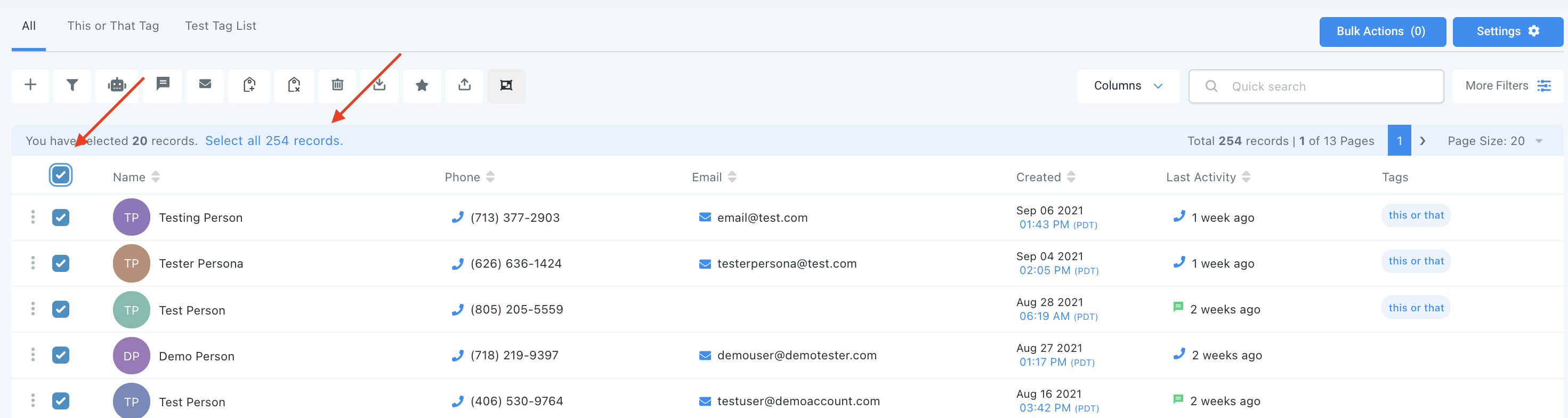
- Navigate to your contacts in HighLevel.
- Check the box to select contact records.
- You can also check the box at the top to select all on that page, and you can click the hyperlink to select all contacts in HighLevel.
Step 2: Choose Your Action
- Choose the trashcan icon for “Delete Contacts”.
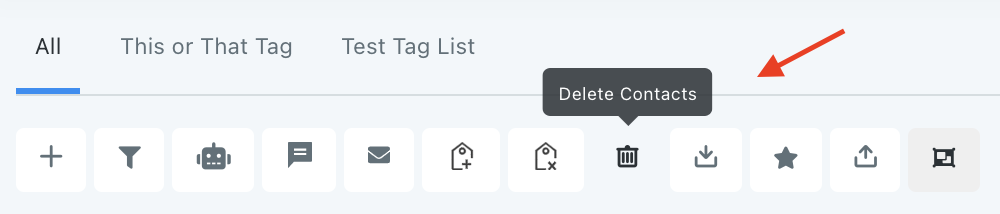
- This will remove the selected contacts from HighLevel entirely.
NOTE: Deleting any contact will also remove them from Conversation, Notes, Opportunities, Tasks, Appointments, Manual Actions and Campaigns.
NOTE: If you cannot see the delete option, please contact your account admin regarding your permissions
Frequently Asked Questions
What does “HighLevel Bulk Actions – Deleting Contacts” cover?
Using the HighLevel Bulk Actions features in your Contacts/Smart Lists section, you can perform multiple one-off actions to selected or all contacts. Here’s how to delete contacts using the bulk action feature in HighLevel:
Start Your HighLevel Free Trial
Browse all GoHighLevel guides · HighLevel Contacts.